Metronome
The Metronome provides a standalone rhythm tool for practice. It plays audible click sounds at a steady tempo with customizable time signatures, accent patterns, and subdivisions.
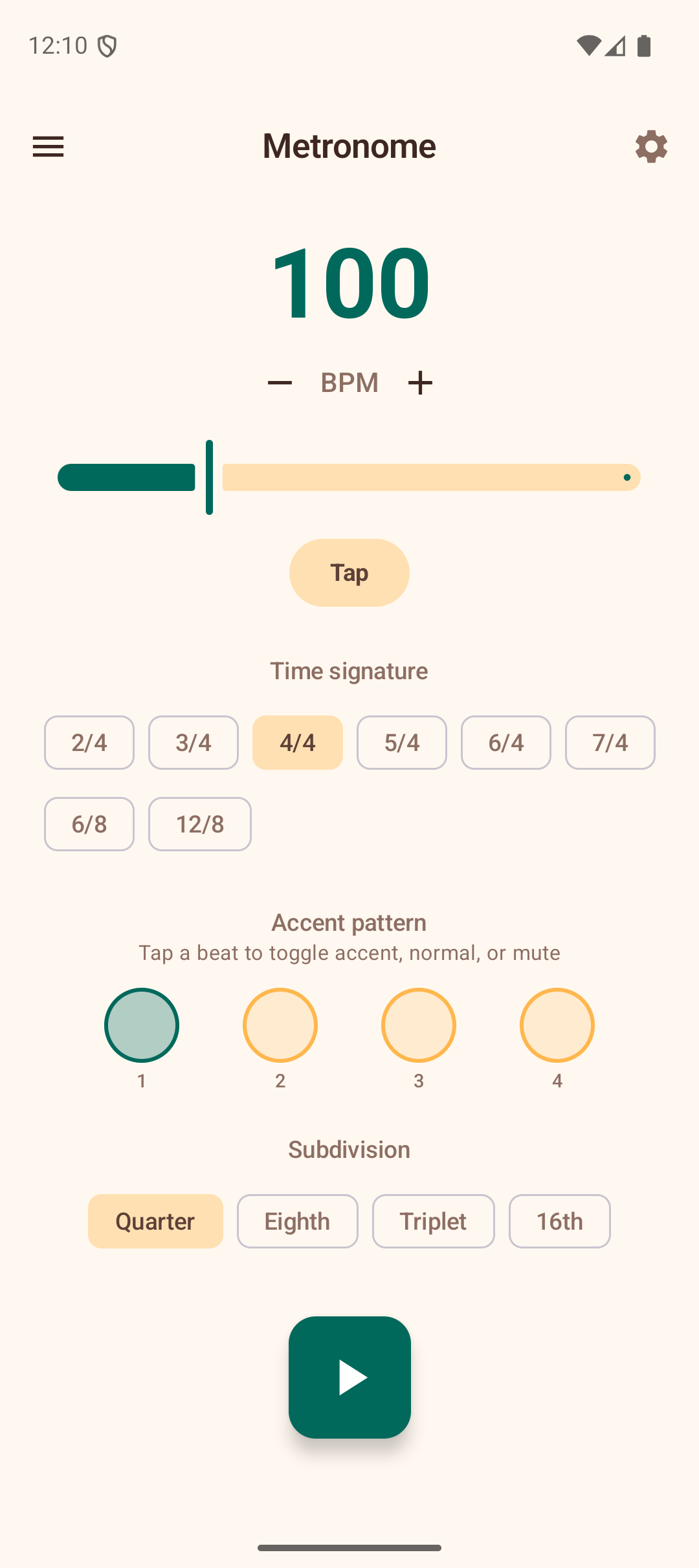
BPM Control
The large number at the top displays the current tempo in beats per minute.
- Slider — drag to quickly set a tempo between 30 and 300 BPM.
- +/- buttons — tap for fine adjustments of 1 BPM at a time.
- Tap Tempo — tap the "Tap" button rhythmically to set the BPM by feel. The app calculates the average tempo from your taps. After 3 seconds of inactivity, the tap history resets.
You can change the BPM while the metronome is playing — the new tempo takes effect on the next beat.
Time Signature
Select from 2/4, 3/4, 4/4, 5/4, 6/4, or 7/4 using the filter chips. The default is 4/4. Changing the time signature updates the number of beat indicators and resets the accent pattern.
Accent Pattern
A row of circles represents each beat in the measure. The first beat is accented by default (shown with a filled primary-color circle). Tap any beat circle to cycle through three states:
- Accent (filled circle) — plays a higher-pitched click at full volume.
- Normal (outlined circle) — plays a standard click.
- Mute (dotted circle) — silent beat, no click but the visual indicator still pulses.
Customizing the accent pattern lets you practice different feels — for example, accenting beats 1 and 3 in 4/4 for a rock groove, or just beat 1 in 3/4 for a waltz.
Subdivisions
Choose how many clicks play per beat:
- Quarter — one click per beat (default).
- Eighth — two clicks per beat.
- Triplet — three clicks per beat.
- 16th — four clicks per beat.
Subdivision clicks are played quieter than main beats so they don't overpower the pulse. Use subdivisions to practice faster strumming patterns or to develop a feel for rhythmic subdivisions.
Playing
Tap the large play button to start the metronome. The beat indicators pulse in sequence, and audible clicks play through the speaker. The button turns red while playing — tap again to stop.
A measure counter at the bottom shows how many complete measures have elapsed since you started, helping you track your practice.
Tips
- Start at a comfortable tempo and gradually increase as you build consistency.
- Use the accent pattern to simulate the rhythmic feel of the song you are learning.
- Eighth-note subdivisions are helpful when learning strumming patterns like the "Island Strum" (D-DU-UDU).
- The metronome is independent of other features — you can leave it running while referring to chord diagrams or progressions in your head.